In my current role within Dell I do pick up a lot of info about customer systems. Usually I get involved when performance is lagging and customers are complaining. From there I have to educate both the customer and the Dell force, in how to size a Equallogic array properly.
Denmark being a small country, most of the Equallogic installations are in the 2-3 arrays size, and due to the customer size it is not easy to add extra arrays as we want. So getting the sizing right from the beginning is cruzial. After we got the hybrid arrays in the Equallogic range, they are properly the most sold type right after the NL-SAS based ones.
So down to SMB sizing of Equallogic; From a Compellent perspective, and a rule of thumb from those systems, we need to get the SSD layer sized properly and not oversubscribe the NL-SAS based PSxxxxE arrays. Compellent uses 20% of all performance should come from Tier-3 (Typical NL-SAS), and all writes should be efficiently handled by Tier-1 (Write-Inensive SSD’s). From my point of view, we can transfer those rules easily to Equallogic sizing.

- The top system in this picture is a PS6110XV with 24x300GB 15K drives in Raid-10
- The middle system is a PS6110X with 24x600GB 10K drives in raid-10.
- Last system is a PS4110E with 12x2TB 7.2K drives in raid-50.
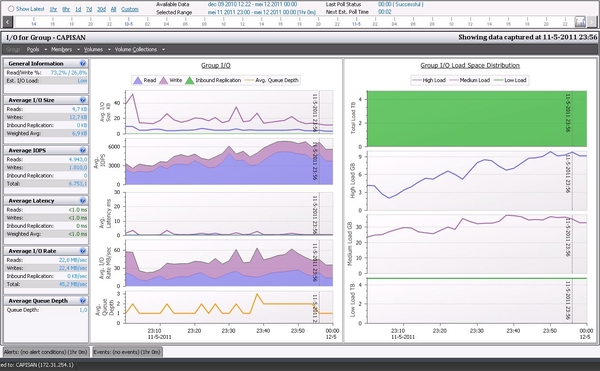
As You might notice 62% of all space is on the PS4110E, and with Equallogic capacity loadbalancing kickin in, it means 62% of every volume resides on the slowest drives. In this case we have 38% of volumes on somewhat fast drives, and with a normal read-write ratio of 70/30 this should be fairly ok. Only comment here was to have 15K drives on 2 arrays and 600GB drives, which should add up to 40% of the combined storage. This customer, did choose to separate the volumes, so some of them only reside on the XV + the E array. For these volumes the capacity loadbalancing was way off, with a 13% of volume space on the XV and 87% on the E. No wonder this costumer complained about performance issues.
Back to sizing with hybrids: In many cases we have sold the popular PS6210XS with 9TB capacity, together with a PS4110E with 2TB or larger drives. In this scenario we have roughly 40% on the XS, about 20% of this space is on the SSD’s. This also translates into approx 2TB SSD capacity for a 25TB system, which is way under the rules stated at the beginning.
So get a proper 25TB Equallogic system with more than 10.000 iops, we will need to use the following
- A PS6210XS with 18TB capacity, it has 7*800GB SSD, and 17×1.2TB 10K drives.
- A PS4110E with 12x1TB disks, in a RAID-50, this gives us a little more than 7TB space.
This would means that 4TB SSD space can be used automatically as Tier-1, rest of the 10K drives in the XS array is considered as Tier-2, and the remaining space on the E array is tier-3. And Tier-3 space is only approx 30% of the total capacity.
So what about those large 2,3,4TB drives ? Never place them in the same pool as a hybrid, your capacity scaling will be way off. But create a separate low-performance pool for the volumes that do not need more performance than the NL-SAS drives provide.
If your unsure which volumes can be placed in which pools, do consider running a Dpack performance gathering tool, together with you Dell presales people. It can be obtained from here; Dell Dpack