Tag: Linkedin

  • Equallogic and IOPS

    Equallogic and IOPS

    I do see a lot of questions regarding Equallogic and IOPS, especially after the Hybrid arrays surfaced in to the public. The XVS from the PS6000-series and the new XS from the 4100 and 6100 series are those arrays I get an IOPS request for most often.

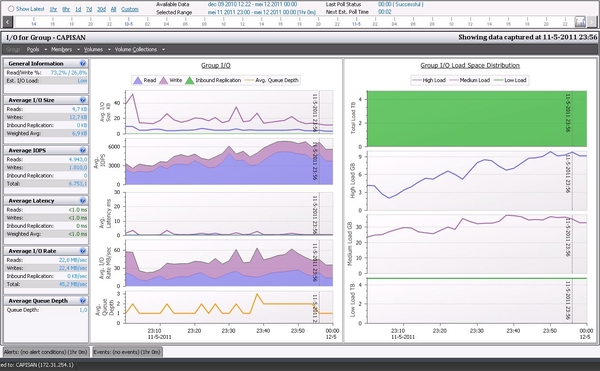
    But it is not so simpel to state an IOPS number for these arrays, I do know the simple math when adding IOPS performance from all disks. This though, does not take a lot of things into calculation like how much can the mirrored cache on the controllers add in performance, what are the read/write ratio etcetera.

    If you talk with some of the Dell partners who are certified in Dell storage, they are able to help with sizing of the Equallogic platform, but also take the above mentioned points into consideration. Dell has an on-line sizing tool, where the partner can create both existing environment (of Equallogic) and show the predicted performance when you buy additional arrays. The same tool certainly also show what a new setup will look like from performance perspective.

    Before you do that why not run Dpack analyse ?

    Dpack is Dell’s Performance Analysis Collection Kit which runs for 4 to 24 hours as usual, but is also able to log for up to 7 days if needed. Dpack runs in memory, so you don not need to install anything and after collecting is done you simply send in the collected data and get a nice performance report back from your Dell partner.

    After reading the report, just tell your Dell Partner to size an Equallogic platform based on the Dpack outcome. Now you’re done and problably get a fine quote with a number of Equallogic arrays. This can be made so simple.

    I’m sorry for not detailing the IOPS for the XVS or XS arrays, but at Dell we use a thing called RPS score which is very dependent of the read/write ratio and the arrays choosen.
  • Client Hyper-V

    Client Hyper-V

    I`m playing around with the new client hyper-v role in Windows 8 Pro ,and it seems like Windows is not just for the mainstreame user. The last couple of days there’s been a lot of writing for and against Hyper-V for the professional users.

    From my view Microsoft finally got it right, I do not have anything against the Metro surface of Win8 it, it simply works well, both with a keyboard or a touchscreen, and people instantly knows where the windows key is.
    This hurts just a little a bit for an old Linux guy like my self, but the when I realized that Microsoft have made it easy for me to create and manage virtual machines in a simple Windows 8, I was thrilled.
    I’m doing a lot of demo stuff for different partners and customers, and often has to reset my environment back to “last known good configuration” when making a new demo ready. So using the builtin snapshots makes it less painful than before. I’ve been using VMware workstation for many years to run my demo environment which consists of both Microsoft and Redhat servers and a virtual Equallogic. This environment is going to be moved to the Microsoft Client Hyper-V with only my Redhat and Linux machines being the outstanding points I need to ensure is working.
    Playing around with an Fedora 17, I came across some issues when trying to install the VM tools, the Fedora wouldn’t start but i might be an graphic driver issue.
    This being said my demo platform is also being “refurbished” to a Windows 2012 Core installation with Equallogic Hit/ME tools installed and all managed from Server manager in the Windows 8. This is a an add-on for Windows 8 and when running this kind of setup it should make my demos less painfull as I will be able to manage all from my native laptop and from a virtualized server.

  • Equallogic all over (again)

    Equallogic all over (again)

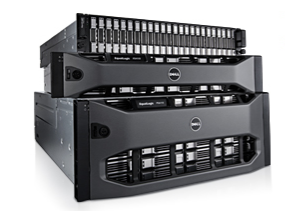
    EQL PS6110/4110Dell recently released the latest series of PS-series array in the Equallogic family,this release with the series 14 and 17 controllers adds 10Gbit to the 6100 and 4100’s. What’s most important with these arrays, is the addition of both copper and fiberbased 10Gbit connections. The copper is standard RJ-45 whch requires Kat-7 cabling, but together with the 8024 from the classic Powerconnect range, you’ll have a cheap killer-setup.

    The fiber is standard SFP+ connections which can be utilized with either TwinAxial copper-cables with integrated SFP+ or with SFP LC modules for longer distances.This combination of both fiber and copper options, is for Equallogic “old school”, this was last featured on Generation 1 and 2 arrays, and series 1 and 2 controllers all the way back in 2004/5

    The biggest news story on the new additions is that for the first time the PS4000-series SMB range of arrays get 10Gbit interfaces, though you are still limited to a max of 2 arrays on the 4000-family. The normal 6000 series can have up to 16 arrays in the same SAN, or 2.1PB of data in total across 768 diskdrives, whereas the 4000 series can hav a total of 48 drives.

    The limitation is still in the numbers of volumes/snapshots/replications you can have on the 4000 series, no change to this scheme

    One other important feature to remember is “vertical port failover” which was re-introduced with the PS6100/4100 series. With reintroduction I mean this is also “old school”, and it is a nice feature, with a tendancy to confuse the IT-admins, as they have to count the number of lights on the switch. It does not matter if the link is activ on controller 1 or 2.

    With the new arrays it is important to populate the same port on both controllers, e.g. RJ-45 or SFP+. You actually have 4 ports in total on the backside, plus two 100Mbit management ports, but you will only have light in one of the four dataports. The vertical port failover will happen between the same type of port, and if accidently have choosen to use SFP+ on controller 1, and RJ-4 on controller 2, you will get downtime if a controller failover should happen.

    The new series of arrays will provide you with up to 160Gbit throughput for a large SAN, and set you back a few bucks. But a Equallogic solution is still cheap, especially when you compare others against the PS6110XS with 7 pcs of large SSD drives and 17 pcs of 10.000rpm drives for a total of +20.000 Iops and 10TB useable storage capacity, all in a single box. And with the performance loadbalancing inside the array it’s a killer.

    About me: I’ve been working with (not for) Equallogic since the early days back in 2004/2005 and firmware revision 0.91. These arrays are my small babies, and when compared to all the other SAN products I havee encountered during the last 17 years, they are still no.1.

  • The english version

    The english version

    Here at this site, I will keep al my arcles written in english. It might be in a combination of both uk-english, and us-english as I get my influence on the language from both sources.

    Most of the time the blogs right here will contain some rather nerdy stuff about server, storage and networking and all what’s in between those segments. I have already written some well-recieved articles about my professional baby; The Equallogic storage arrays which I have been following since the early days of 2005. Except for this networking with Force10 and Dell servers might also be topics here.

    It would be intriguing to get some more knowledge of Dell Secureworks, but this might take some time before I’m ready to post about this.

    I reserve the right to also post some blogs of private character, for those people I got to know around Europe and rest of the world.

  • Backup is not for real men

    Backup is not for real men

    Melodi: Yesterday

    Yesterday,
    All those backups seemed a waste of pay.
    Now my database has gone away.
    Oh I believe in yesterday.

    Suddenly,
    There’s not half the files there used to be,
    And there’s a milestone hanging over me
    The system crashed so suddenly.

    I pushed something wrong
    What it was I could not say.
    Now all my data’s gone
    and I long for yesterday-ay-ay-ay.

    Yesterday,
    The need for back-ups seemed so far away.
    I knew my data was all here to stay,
    Now I believe in yesterday.

  • Going to a new world

    Going to a new world

    This is about Merging pools in Equallogic
    When Equallogic was introduced back in 2004 we had no pools to divide all the arrays in to. Back then all arrays was filled with SATA drives, and it was only with the introduction of the PS3000 series we got SAS drives. I do still believe most of the pressure was from the Exchange guys back then to get the SAS drives, when they had a terrifying demand for Raid-10 and SAS 15.000 rpm.
    Then we needed to divide all the storage arrays into different pools, and separating the disk spindle types into each compartement. This worked well for a number of years, and customers were happy to upgrade to a max of 16 arrays in each SAN, which after the PS5500 surfaced could be extended to 768 diskdrives in each SAN. Today we can do 1.5 Petabyte, and in the near future with certification of the 3TB SATA drives, Equallogic reaches even higher to 2.1 Petabyte.
    Then everything changed with the introduction of the 5.1 firmware with the new autotiering feature, doing a whole lot to both existing installations, but also when selling SAN’s to new customers. Now we place all arrays back into the same pool with a maximum of 8 arrays in each pool and still a total of 16 arrays. This placed customers in an awkward situation where they needed to buy additional arrays (or loan a demo from Dell), to be able to move the existing arrays into a single pool.
    Only a few customers are aware of the Merging Pool feature which has been integrated into the Group manager (browser). With this feature you can migrate two pools into one, and then get all the benefits of the auto tiering feature, which by far is the most sexy thing Equallogic has introduced since 2004 (My believe).
    So please do migrate all the arrays online into one pool, I will do an test next week to actually see this work in real life, a not only in the virtual Equallogic I’m running.

  • Linux 20 years

    Linux 20 years

    A happy birthday from Microsoft

  • Officielt billede af Hr. Jensen

    Officielt billede af Hr. Jensen

    image

    Mit officielle job billede

  • Equallogic past and new present

    Equallogic past and new present

    A good colleague of mine pointed out a very interesting feature in the new PS6100 arrays, recently announced by Dell, the vertical port failover. But this is indeed an old feature…..

    When we worked with the old Type-1 and 2 controllers (the grey and the blue), you actually didn’t care where the ethernet connection where.
    You simply looked at the switch and looked after the 3 connecting lights out of 6 possible.
    I cant remember what it was called back then, I worked for a Equallogic reseller, and all my material is lost.

    But you could fail over a single networking port, to the other controller, which did cause some funny situations in the datacentres when an administrator wanted to have all the connections on a single controller “because it did look better”, and then he plugged out a cable to move the connection to the other controller. I did have some calls at that point from customers who couldn’t understand why the “passive” controller had all the connections. It did take some explaining to tell them, there was nothing wrong, and this was all part off the Equallogic virtualization.

    From type 3 I believe it was, until the type 10 controllers, we only had the controller failover, where the whole controller was failed over to the secondary.

    BUT now it’s back to basics, Dell has re-introduced the “Vertical Port Failover” on type 11 and 12 controllers. This is a significant gain, as you can fail a single network cable, and still be sure you have maximum throughput. As an old Equallogic guy this sweetens my heart.

    By the way, Dell has also introduced some new arrays with the type 11 and 12 controllers. The type 11 is actually for the new PS6100 series 1Gbit arrays, and besides 4 x 1Gbit ports this also feature a separate management port. The PS6100 comes in different flavours, the 4U 24×3.5″ disk SATA based, and the 2U 12×3.5″ or 24×2.5″ disks in SAS or nearline SAS drives.

    The type 12 controllers is the PS4100 with same configuration options as the bigbrother, but still the 4000 departemental arrays still has 2x1Gbit networking ports, and a management port.

  • The Cloud

    The Cloud

    Looking back in the mirror we need to realise that cloud systems have been available for some years now. Not always adressed as cloud system.
    In 2007 Sun had a system codenamed Honeycomb, an intriguing setup with several nodes sharing the data across the installation. What makes it an cloud solution and an private cloud, is the open interface to other applications. Customers could buy consultancy to integrate it into the Honeycomb API, or do it by them self. I was designed towards the public and health industry, especially for the Hospital sector, and all the scanning equipment they have. (Remember to read more)

    (more…)